
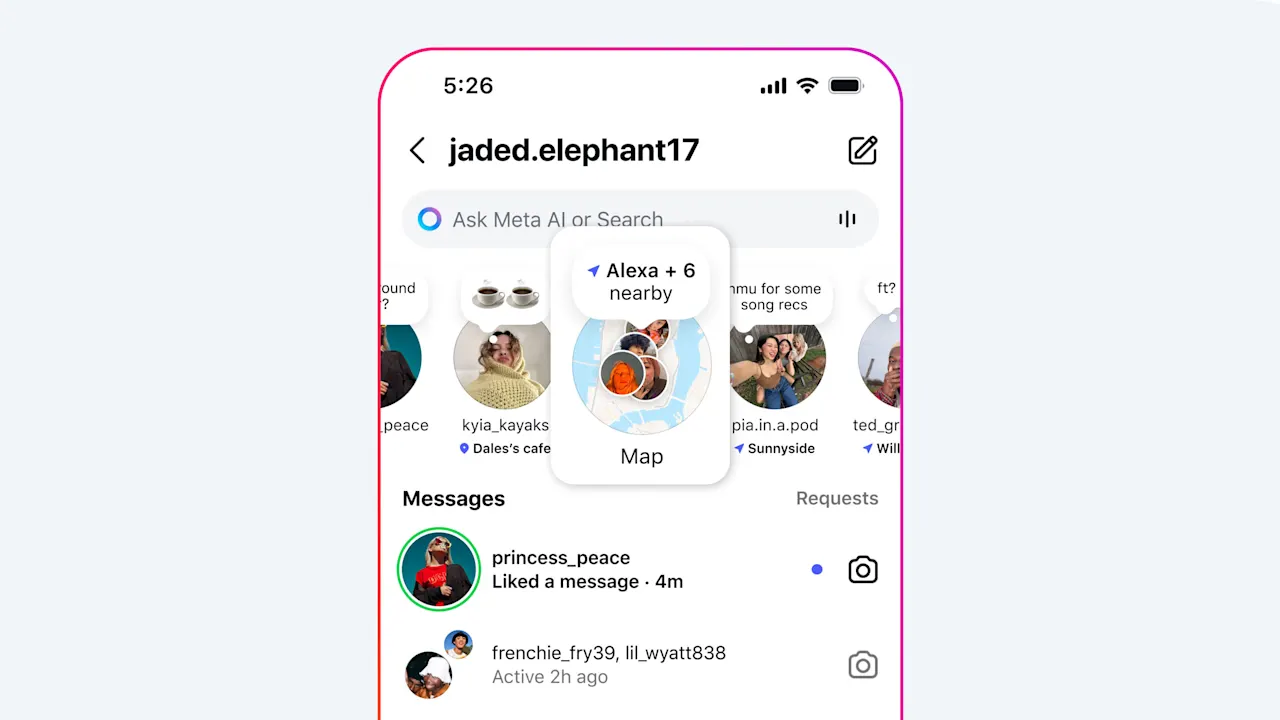
Instagram’s new location sharing map: how it works and how to turn it off
Instagram’s new location-sharing Map feature is raising privacy concerns among some users, who worry their whereabouts could be tracked or misused.
Meta announced the rollout this week, introducing a map that lets U.S. users share their locations and see location-based content from friends—similar to Snapchat’s Snap Map or Apple’s Find My.
This feature is opt-in and off by default. Users also have the option to turn off location sharing “at any time,” Meta said in a release. Here’s how to do it.
Accessing the Map feature
Open the Instagram app and tap the arrow icon in the top right of your home feed to open Messages. The Map option should appear at the top of your inbox.
The first time you open Map, you’ll see a screen labeled “Who can see your location.” You can choose to share it with:
- Friends (followers you follow back)
- Your Close Friends list
- Selected users
- No one
Updating your settings
To update your preferences, navigate to your profile, tap the settings icon in the top-right corner, select “Story, live and location,” then choose “Location sharing.” From there, you can adjust who sees your location.
On the Map, different icons indicate your status:
- A blue arrow means you’re sharing your location with your selected audience.
- A red dot indicates you’re not sharing your location.
- An orange triangle means you need to enable location permissions on your device to share your location.
How to turn off location services entirely
To shut off location services for Instagram on an iPhone, open Settings and tap through from Privacy & Security to Location Services. Scroll to Instagram and select “Never.”
To turn off location services for Instagram on an Android device, open your phone’s settings and scroll to Apps. Select Instagram, then tap Permissions and choose Location. From here, you can select “Don’t allow” to completely block location access, or opt for “Allow only while using the app” or “Ask every time” for more control. (You can also toggle off precise location if you prefer.)
Even with location sharing off, you can still see friends who share their location with you. If you enable it, your location updates whenever you open the app or return to it from the background, Meta says.
For teen users
Parents with supervision enabled can control whether their child has access to location sharing, see who they’re sharing with, and receive notifications if location sharing is turned on.
Originally published by fastcompany.com. Syndicated material does not necessarily reflect the views of Grazia British.
More Culture

Don’t Pull Out of Germany
Merz’s stupidity is no excuse for a stupid response. Source link

Step inside the gorgeous, futuristic offices of Vast, the startup designing the next-gen space station
A tall baobab tree greets people inside the Long Beach, California, headquarters of Vast, an aerospace company that is building the space station of the future. It’s planted beneath a…

5 ways high-performing teams stay calm when everything’s on fire
When markets swing, plans break, inboxes explode, and everyone starts saying the situation is “unprecedented” again, most teams do what humans have always done under pressure: they grip…

Confused Trump Openly Admits Plot to Rig Midterms as Polls Turn Brutal
Last week, the Supreme Court gutted protections against racial gerrymandering, and Donald Trump is already urging Republicans to seize on it. Trump unleashed a Truth Social rant on Monday…